Sunday, May 9, 2010

Happy Mothers Day!...

Happy Mothers day to all you moms, undoubtedly the hardest (and most important) job out there.

A few days ago I posted about how to deal with the problems that come with photographing a person with glasses.

The person I was photographing was one of my twins and the reason for the shoot was their gift for their mom.

The image below is the finished product, each of the girls were shot individually and them combined in Photoshop, similar to the "Twilight Poster" shoot.

By doing it this way all three girls were lit exactly the same, I didn't have to worry about who was casting a shadow on who, or listen to the inevitable bickering that comes when three teenage girls stand to close to each other.

;)

Click on the image below to view larger and in a new window.


Saturday, May 8, 2010

Bumper stickers…

We have been shooting a lot on location = lots of driving = seeing every bumper sticker ever printed (along with way too many people doing things like reading or putting on makeup while driving in the fast lane).

Here are a couple bumper stickers I really liked.


“Remember who you wanted to be?”


“To get something you’ve never had, you’ll have to do something you’ve never done.”

Thursday, May 6, 2010

Some Joel Grimes seminar images...

These images from the Joel Grimes seminar are long over due.

It was a phenominal weekend, Joel went deep into photography, image editing, and marketing. I left feeling like he held nothing back. Not only did he teach, but everyone was able to shoot as much as they wanted and received individual attention at each and every shooting station until they "got it". No question was left unanswered.

I think this quote from one of the attendees pretty much says it all:

"What did I think about the workshop? I wanted to call Joel this morning and complain! I didn't sleep last night thinking of all the images I want to shoot and when, and where!

The workshop was wonderful, Joel could not have been more accommodating to me and all the attendees, he said time and time again during the workshop he loves to pass on his knowledge and he still gets excited creating images and it shows."


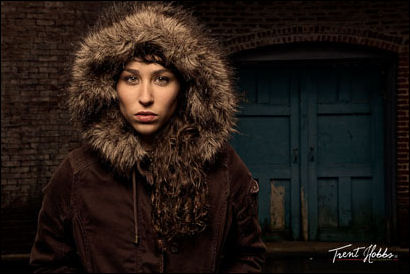
Here are images from some of the attendees. Keep in mind that all of the outdoor images below where shot with a single speedlight. Simple lighting, great results.

From Trent Hobbs:


From Laura Imbeault:


From Kevin D. Couture:


You can also read what Chad Doyon wrote about his experience at the seminar on his blog.

If you have the opportunity to attend a Joel Grimes seminar, run, don't walk, to get your ticket.

(Click on any image to view larger and in a new window.)

Wednesday, May 5, 2010

VIVA LA WEDDING ON STYLE ME PRETTY!!

Viva la wedding is just so excited to have one of our beautiful couples featured on Style Me Pretty.

Style Me Pretty is a style savvy wedding resource devoted to the modern bride. They cover everything from gorgeous real weddings to up and coming vendors and seasoned pros in the industry. Featuring only the most chic and style centric wedding related content SMP is continually discovering new and brilliantly talented vendors, brides with an eye for all things gorgeous, and the personal loves of editor Abby Larson. SMP readers look far beyond your cookie-cutter wedding ideas and strive to design an affair that is both personal and incredibly charming.

Launched in February of 2007, SMP has become a mainstay in the wedding industry. With nods in nearly every major bridal magazine including Real Simple Weddings, Martha Stewart Weddings, Elegant Weddings and Modern Bride along with features in such publications as Blog Watch in the Wall Street Journal, SMP is quickly becoming one of the most read wedding resources on the web.

Now on to the wedding...

Krystel & Ivan were married at Fairmont Le Chateau Montebello on August 22nd 2009. They were such a wonderful couple to work with and as you'll see on SMP, Krystel was a true DIY bride and all about the details. Krystel & Ivan had some great vendors on board including the talented Melissa Johnston who is responsible for all the images and did a fabulous job capturing their day. Enjoy!

Krystel & Ivan's wedding featured on Style Me Pretty!

People in minivans are cool!...

Got the pride in my ride… in my swagger wagon…

;)


Enjoy the video below or head over to YouTube to watch it.

Tuesday, May 4, 2010

Photographing people with glasses...


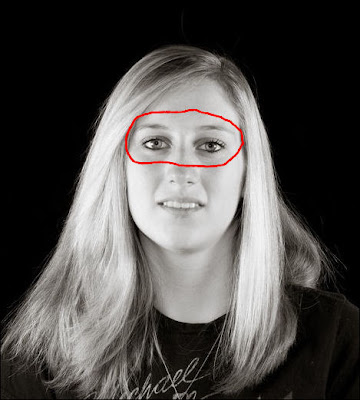
Over the weekend I was photographing my girls for a canvas pano they are giving to their mom for Mothers Day.

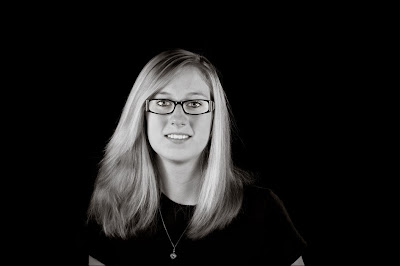
One of the problems I faced (other than the fact when I talk they hear "blah, blah, blah") is two of my three girls wear glasses. To make it even harder Emma (pictured above) has eye glasses with very wide sides (that work great at blocking light) AND she wears them further away from her eyes because she has incredibly long eye lashes.
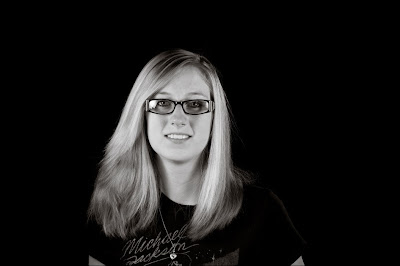

So I took a few shots and was not at all liking the results so I decided to try something I had been shown by Jed Taufer, I instructed Emma to try to maintain her position as best she could while reaching up and removing her eye glasses and snapped a couple shots of her with her glasses off (this will work best if you shoot on a tripod).
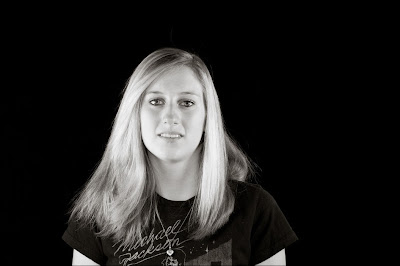

I took all the images into Photoshop and using a lasso tool made a rough selection around her eyes (in the image without glasses).


I copied the selection and then pasted it into the image with the glasses. I lowered the opacity of the eyes I brought into the image and this helped me get them into the correct position. Make sure you increase it back to 100% before moving on. With the layer of the imported eyes selected I created a "hide all" (black) layer mask by holding down the "ALT" key and then clicking on the layer mask button.
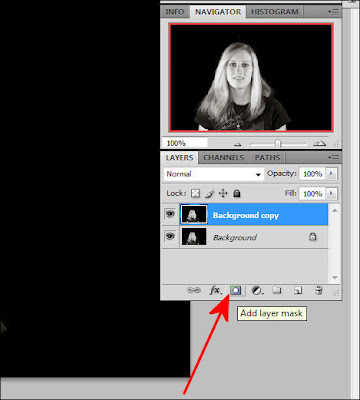

Then using a white brush I carefully erase the lenses in her glasses revealing her eyes that I brought over and "hid" in the layer mask. If you make a mistake while erasing and remove part of the frames simply change the brush to black and paint over the area you meant to keep and it will "re-appear".

Here is another look at the finished product.


And that was pretty much it. If folks find these instructions hard to follow I might be talked into doing a "how to" video on this.

Click on any of the images to view larger and in a new window.

Monday, May 3, 2010

PaintShop Pro X3 on sale this week...


Through the end of this week (May 8th) you can buy the latest release of PaintShop Pro X3 from Corel at Staples for just $49.

I know some of you may look down your nose at this, even though I have CS4 (and am anxiously waiting for CS5 to hit my door step) there are times I want to do some quick and simple editing and PaintShop Pro fits the bill nicely.

Plus, you may be new to photography (or editing) and don't want to take out a second mortgage to get Adobe Photoshop, well PaintShop Pro X3 is a more than adequate alternative.

Below you will find an intro video showing some of the features new to X3. You can also head over to the PaintShop Pro X3 YouTube channel where they have 44 new videos that demonstrate X3 features, tips, and techniques.