Carrie Underwood's video for "Mama's Song" premiered today featuring none other than her mom Carole and husband Mike Fisher. This sweet, sweet song is about leaving the nest and finding the man of her dreams. Does a song dedicated to your mom on your wedding day get any better than this?
Mama, you taught me to do the right things
So now you have to let your baby fly
You've given me everything that I will need
To make it through this crazy thing called life
And I know you watched me grow up
And only want what's best for me
And I think I found the answer to your prayers
And he is good, so good
He treats your little girl like a real man should
He is good, so good
He makes promises he keeps
No he's never gonna leave
So don't you worry about me
Don't you worry about me
Mama there's no way you'll ever lose me
Giving me away is not goodbye
As you watch me walk down to my future
I hope tears of joy are in your eyes
'Cause he is good, so good
And he treats your little girl like a real man should
He is good, so good
He makes promises he keeps
No he's never gonna leave
So don't you worry about me
Don't you worry about me...
Friday, September 24, 2010

Bits & Pieces... Odds & Ends...
Today I am serving up some Bits & Pieces and one snippy comment, but I'll save that for last.

A friend of mine (hey Mike) does food photography and does it very well. One of his clients is "Once Upon a Chef".
I followed through one of his links to see more of the food photography and soon forgot why I was there and started collecting recipes fast and furiously.
Like the Homemade Caesar Salad Dressing, Late Summer Corn Soup, Crispy Tilapia Fingers, Chocolate Fudge Crinkles, Coconut Dream Tart.
So head over to Once Upon a Chef for some delicious recipes and wonderful photography.
The other day we did a review of MaxiVista, an iPad utility that will allow you to extend your desktop for a dual monitor setup.
Well, you will also want to check out (and bookmark) Terry Whites "Best App Site" for the "8 Must Have iPad Apps for Photographers".
Other to check out is the new release from Adobe "Photoshop Express" (free), the iPad photo editing app "PhotoPad" (free), and "Photo Wall for iPad" (yes, free) will help you make beautiful (and custom) photo collages that you can share by uploading or emailing (see their
YouTube video here).
Now... for snippy.
Only once in the 5 years and almost 700 posts have I said something less than complimentary (which can be found here), but this has my panties in such a bunch that I can't keep silent about it.
This tweet came across almost a week ago (I thought time would make it less annoying, but I was wrong): "Today's wedding: fabulous! Today's caterer: not so much. late, ran out of food; I had 3 rolls for dinner."
I find a few things upsetting about this kind of irresponsible "tweet", if you are going to publicly take someone to task (and perhaps cost them business) you need to have substance behind your statement, not just throw out an "Enquirer" headline.
Maybe there was a (legitimate and unavoidable) reason they were late, maybe they were given an incorrect head count and that's why they ran out of food, and maybe the caterer deserves criticism, but it should come from the person who hired them, NOT the photographer.
Impacting the livelihood of another should not be undertaken so flippantly.
In my eyes it reflects more poorly on the photographer than it does the caterer.
Thursday, September 23, 2010
Playing in the shadows... another tutorial...
Here are some images that, though I liked the originals, wanted to change them just a bit.
The first set of images are from one of this years weddings.
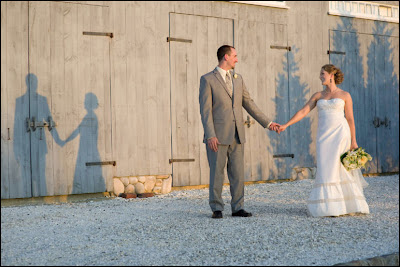
Here is the original image:
 And I wanted the shadow that was cast in this image:
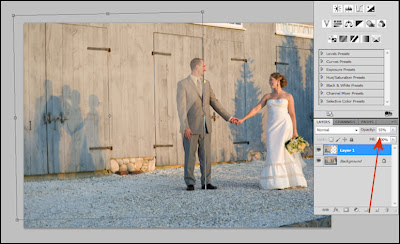
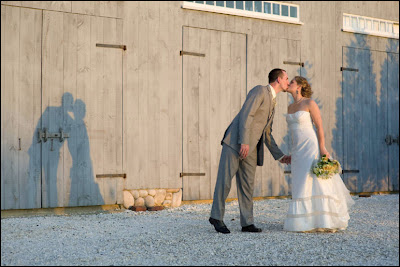 So I copied the the left half of the image of the shadow I wanted and brought it into image one. I dropped the opacity so I could see through it and then used free transform to get the boards on the side of the barn correctly aligned in both images.
I then created a layer mask for each of the two layers and using black hid the section of the barn that had the shadow of the bride and groom standing separately, then using white I painted over the "kissing shadow" to have it show through.
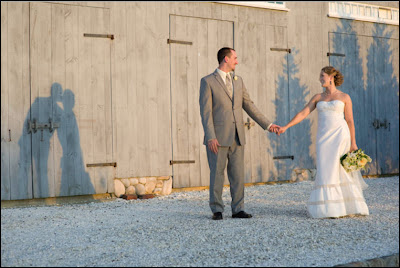
 The final step was to burn the shadow slightly to make it a bit more prominent, and here is the final image:
In this next set of images it's a bit different. Here is the original image:
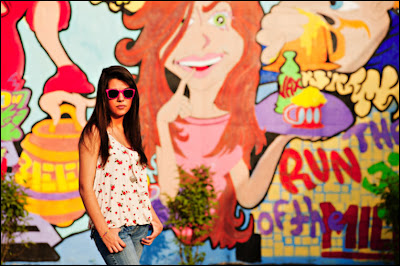 There was no shadow at all and the shot itself was a bit serious which does not reflect the fun personality of this young woman so I grabbed one of the "more fun" images and using the quick select tool grabbed just her from the shot. As I was going to use it as a shadow a precise cutout wasn't needed so I was happy with what quick select gave me.
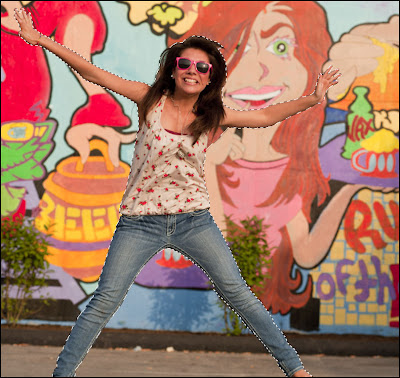 I then brought the selection of her jumping into the original picture.
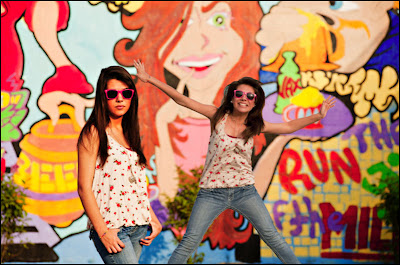 With the "jumping" layer selected I selected the "Lock Transparent Pixels" icon (visible right next to the paint brush above the layer). I then filled it with black (option+delete for MAC or Alt+Backspace for PC).
Next I applied the Gaussian Blur with the radius set to 20 pixels and then dropped the opacity to (around) 60%.
Because there was a bush in front of the wall where the shadow fell I used a layer mask to remove some of the shadow off the bush to make it look just a bit more natural in how the shadow fell over the leaves.
Here is the final shot:

Clicking on any of the images will open them larger and in a new window
The first set of images are from one of this years weddings.
Here is the original image:
 And I wanted the shadow that was cast in this image:
 So I copied the the left half of the image of the shadow I wanted and brought it into image one. I dropped the opacity so I could see through it and then used free transform to get the boards on the side of the barn correctly aligned in both images.
I then created a layer mask for each of the two layers and using black hid the section of the barn that had the shadow of the bride and groom standing separately, then using white I painted over the "kissing shadow" to have it show through.
 The final step was to burn the shadow slightly to make it a bit more prominent, and here is the final image:
In this next set of images it's a bit different. Here is the original image:
 There was no shadow at all and the shot itself was a bit serious which does not reflect the fun personality of this young woman so I grabbed one of the "more fun" images and using the quick select tool grabbed just her from the shot. As I was going to use it as a shadow a precise cutout wasn't needed so I was happy with what quick select gave me.
 I then brought the selection of her jumping into the original picture.
 With the "jumping" layer selected I selected the "Lock Transparent Pixels" icon (visible right next to the paint brush above the layer). I then filled it with black (option+delete for MAC or Alt+Backspace for PC).
Next I applied the Gaussian Blur with the radius set to 20 pixels and then dropped the opacity to (around) 60%.
Because there was a bush in front of the wall where the shadow fell I used a layer mask to remove some of the shadow off the bush to make it look just a bit more natural in how the shadow fell over the leaves.
Here is the final shot:

Wednesday, September 22, 2010
GRAND OPENING - WITH LOVE BRIDAL BOUTIQUE
 It's finally here! For all you brides-to-be anxiously awaiting the opening of With Love Bridal Boutique we're happy to tell you, the wait is over! While With Love has actually been open for over a week now, their official Grand Opening will take place this Saturday September 25 2010. Come on by With Love Bridal Boutique from 10am-5pm to celebrate!
Located at 1501 Main Street in Stittsville, not only do they have an amazing selection of brand new gowns for you to choose from (Blush by Jim Hjelm and Mikaela are Viva's personal favourites!) they also have a floor dedicated to consignment - giving brides the opportunity to pass on their once loved wedding dress to another lucky bride-to-be while recouping some of the expense of their wedding day. Once Dana has helped you find the perfect dress, new or once loved, Becky is onsite to make sure it fits like a glove! Offering alterations of all kinds, Becky's your girl! And that's not all...
What's a fabulously fitting dress without accessories? With Love offers an amazing selection of jewelry hand crafted by Ottawa area artists (Something Jeweled by Sarah Walsh and Urbanite Jewelry by Krista Leben to name but two) along with beautiful veils and simply stunning hair pieces as well as sashes, boleros and floral embellishments created in house to help complete your look. Viva la wedding could not be happier for Becky and Dana who have teamed up to bring you this truly unique bridal boutique. What's so unique about it you ask? Here are the girls to tell you themselves.
About Us:
With Love Bridal Boutique stands apart from other bridal boutiques by catering to a niche often overlooked: the bride’s desire to not only find the perfect dress, but to also create a look she can call her own. We offer collections of modern, sophisticated, and stunning dresses from designers Blush by Jim Hjelm, Mikaella, White One, Jasmine Bridal, Jacquelin Bridals and bridesmaids from B2, Belsoie and Pretty Maids.
With Love Bridal Boutique presents brides a unique and personalized shopping experience by offering an intimate and relaxed environment to try gowns and accessories with their loved ones. With an emphasis on individualized attention, With Love ensures brides have a comfortable and memorable shopping experience.
In keeping with our desire to offer brides a customized look for her wedding day, With Love offers beautifully hand crafted jewellery by a variety of local artisans as well as veils, feather fascinators, hair pins and hair bands created in house. We also offer handmade custom accessories such as clutches, sashes, boleros and flower embellishments to allow brides to truly reflect their individual sense of style.
From the initial appointment to the delivery of the dress, With Love brides are treated with respect, courtesy, and exceptional customer service. Your shopping experience with us will be one of the many memorable moments in the wedding process.
With Love,
Becky and Dana


Photo Credits: m photography by Mélanie Rebane
WEDDING DRESS WEDNESDAY
 Knowing Viva's weakness for designer shoes, it should come as no surprise that this month's Wedding Dress Wednesday post features a gown that is not only stunning on its own but also lets you show off those Louboutins, Manolos, and Jimmy Choos.
 This beautiful dress is Style 1501 by Mikaella Bridal.
Since 1937, Paloma Blanca has been producing exceptional bridal gowns from its own manufacturing facilities in Toronto, Ontario, Canada. Paloma Blanca has a reputation for designing and producing high quality fabrications with impeccable attention to detail, styling, fit and "on time" service.
March 1, 2004 saw the launch of Paloma Blanca's new bridal collection, Mikaella Bridal, designed to provide the bridal industry with a high quality product at an attractive price point while keeping production in Canada. Following in the same standards that has earned Paloma Blanca its reputation, Mikaela Bridal provides the 21st century bride with classic styling coupled with a modern flair.
Is this your dress? Then head on over to With Love Bridal Boutique, now open at 1501 Main Street in Stittsville.
Tutorial - Photographing people with glasses...
 I ran this tutorial about 6 months ago, but as we have soooo many new readers and this is a very useful technique I am running it again.
People will often say to my wife "you must have beautiful pictures of your girls" (just because I own a camera or two) and her response is always the same "the cobbler's wife has no shoes", so I decided to surprise her by photographing my girls for a canvas pano that they would give her for Mothers Day.
One of the problems I faced (other than the fact when I talk my girls hear "blah, blah, blah") is two of my three girls wear glasses. To make it even harder Emma (pictured above) has glasses with very wide sides (that work great at blocking light) AND she wears them further away from her eyes because she has incredibly long eye lashes.
 So I took a few shots and was not at all liking the results at all so I decided to try something I had been shown by Jed Taufer, I instructed Emma to try to maintain her position as best she could while reaching up and removing her eye glasses and snapped a couple shots of her with her glasses off (this will work best if you shoot on a tripod).
 I took all the images into Photoshop and using a lasso tool made a rough selection around her eyes (in the image without glasses).
 I copied the selection and then pasted it into the image with the glasses. I lowered the opacity of the eyes I brought into the image and this helped me get them into the correct position. Make sure you increase it back to 100% before moving on. With the layer of the imported eyes selected I created a "hide all" (black) layer mask by holding down the "ALT" key and then clicking on the layer mask button.
 Then using a white brush (with the primary/original layer selected) I carefully erased the lenses in her glasses revealing her eyes that I brought over and "hid" in the layer mask. If you make a mistake while erasing and remove part of the frames simply change the brush to black and paint over the area you meant to keep and it will "re-appear" (just remember the rule "white reveals and black conceals").
Here is her finished image.
And that was pretty much it.The image below is the finished product, each of the girls were shot individually and them combined in Photoshop, using techniques similar to the "Twilight Poster" shoot.
By doing it this way all three girls were lit exactly the same, I didn't have to worry about who was casting a shadow on who, or listen to the inevitable bickering that comes when three teenage girls standing to close to each other.
;)
And so I would not have to worry about "perspective" when I combined all three girls my camera was on a tripod (and was not moved) and once I shot the first girl her position was marked and each girl that followed stood in exactly the same place.

Monday, September 20, 2010
If you have an iPad...

Of course that title would be even more interesting and fun if sung to the tune from the Fiddler on the Roof "If I were a rich man..." Ahhhh, the things that amuse me.
;)
This does more than amuse me. MaxiVista has created a great piece of software that allows you to use your iPad as a second monitor for either your laptop or desktop computer.
It was easy to install and worked perfectly the very first time I used it, 2 very important things (for me at least).
Even cooler, you can get it for less than $10!
This comes in handy especially when it comes to your laptop, it will give you maximum image viewing space.
I used it in a couple different ways, when using Photoshop I dumped all my tools into my iPad so that I had the entire laptop screen to view my images as large as possible.
Because my laptop screen is color corrected and my iPad is not, I actually put Lightroom (the program) on the iPad and had the image I was editing on my (color corrected) laptop screen.
MaxiVista is very inexpensive, works perfectly, and improves your workflow. Anything else I need to say?
Well, I could also tell you that if you don't have an iPad but have two computers (like a desktop and a laptop) they make a version of the software that allows you to share those screens too.
You can download a free trial here.
I know that someone out there is going to say "an iPad is a pretty expensive second monitor". Couple of things I want to say to that, if you add the cost of a second monitor AND a dual monitor card you are darn close to the price of an iPad. A dual monitor setup is just that, two monitors with a relatively limited role.
An iPad will allow you to do much more, not the least of which is to be one of your marketing tools by allowing presentation of your work ANYWHERE to potential clients and even allow that potential client to sign a contract (right on the iPad) making them your actual client.
Below is a short (1 minute) demo video showing MaxiVista at work, if it doesn't come through with your subscription you can head back to the blog or over to YouTube to watch it.
Subscribe to:
Posts (Atom)